

How to configure email in Thunderbird
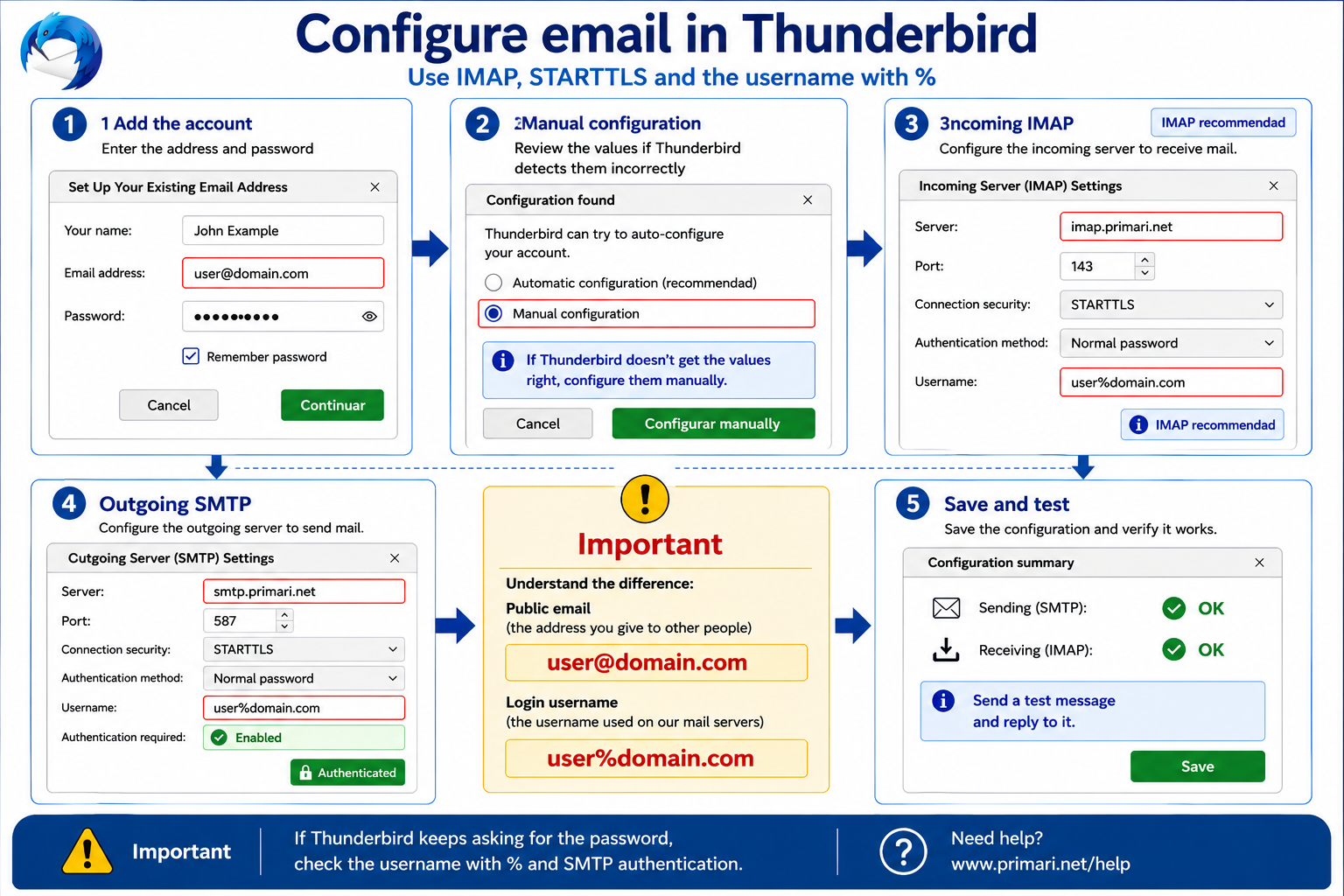
In Thunderbird we recommend configuring PRIMARI.NET email with IMAP, incoming server imap.primari.net, outgoing server smtp.primari.net, STARTTLS and the username in user%domain.com format.
Reviewed:
Quick answer
In Thunderbird, use manual configuration if automatic detection does not choose the correct values.
The recommended PRIMARI.NET configuration is:
- incoming account:
IMAP; - incoming server:
imap.primari.net; - IMAP port:
143; - incoming security:
STARTTLS; - outgoing SMTP server:
smtp.primari.net; - SMTP port:
587; - outgoing security:
STARTTLS; - SMTP authentication: enabled;
- username: the address with
%instead of@.
For example:
Email address: user@domain.com
Username: user%domain.com
Before you begin
Have this information ready:
- the full email address;
- the mailbox password;
- the username in
user%domain.comformat; - the PRIMARI.NET mail server names.
If you are not sure the password is correct, first try logging in at webmail.primari.net. If webmail does not work either, the mailbox or password should be checked before changing Thunderbird settings.
Recommended settings
- Incoming account type:
IMAP - Incoming server:
imap.primari.net - IMAP port:
143 - IMAP security:
STARTTLS - Outgoing server:
smtp.primari.net - SMTP port:
587 - SMTP security:
STARTTLS - SMTP authentication: yes
- Username:
user%domain.com
We recommend IMAP because it keeps mail on the server and lets several devices use the same mailbox.
Add the account in Thunderbird
When adding the account, enter the email address and the mailbox password.
Thunderbird may try to find the settings automatically. If it proposes server names, ports or security settings that do not match PRIMARI.NET, review them before saving.
If automatic detection fails, choose manual configuration and enter the values from the table above.
Manual configuration if Thunderbird detects the wrong settings
In manual configuration, check especially:
- the incoming server is
imap.primari.net; - the outgoing server is
smtp.primari.net; - the username is
user%domain.com, notuser@domain.com.
Both incoming and outgoing connections should use STARTTLS.
Incoming IMAP settings
To receive and read mail, use:
Server: imap.primari.net
Port: 143
Security: STARTTLS
Username: user%domain.com
IMAP is the recommended option for most users.
Outgoing SMTP settings
To send mail, use:
Server: smtp.primari.net
Port: 587
Security: STARTTLS
Authentication: enabled
Username: user%domain.com
The outgoing server also requires authentication. Configuring only the incoming part is not enough.
Why the address uses @ but the username uses %
The public email address is the one you give to other people:
user@domain.comBut the username PRIMARI.NET uses to identify the mailbox on the mail servers is:
user%domain.comThis is normal in the PRIMARI.NET configuration. If Thunderbird tries to authenticate with user@domain.com, it may repeatedly ask for the password or fail to send and receive mail.
POP3 alternative
POP3 is also available, but it is only recommended in specific cases.
If you really need POP3, use:
Server: pop3.primari.net
Port: 110
Security: STARTTLS
Username: user%domain.com
Before switching from IMAP to POP3, check whether you use mail on other devices. POP3 may download messages to one device and create differences between computers, phones and webmail.
How to test sending and receiving
After saving the account:
- Send a message to an external address.
- Reply from that external address.
- Check that Thunderbird receives the reply.
- Also check that the sent message is recorded correctly.
This tests both sending and receiving.
Visual guide
Common errors
The most common errors are:
- entering
user@domain.comas the username instead ofuser%domain.com; - leaving SMTP authentication disabled;
- using a port that does not match
STARTTLS; - using an old password;
- mistyping the incoming or outgoing server name;
- accepting an automatic setup that does not match PRIMARI.NET.
If you can receive but not send, check SMTP, port 587, STARTTLS and authentication. If you can send but not receive, check IMAP, port 143, STARTTLS, username and password.
When to contact PRIMARI.NET
Contact PRIMARI.NET if Thunderbird keeps asking for the password, if certificate warnings appear, if webmail works but Thunderbird does not, or if you are unsure which value to enter in a field.
We can help check whether the problem is the mailbox, the password, the device or the domain DNS configuration.