

Transfers
How to transfer a domain from PRIMARI to another registrar
From PANELL you can unlock the domain, request the transfer code and follow the request status before giving the code to the new registrar.
Reviewed:
Quick Answer
If you want to move a domain from PRIMARI to another registrar, start the request from PANELL.
Normally you need to check two things: that the domain allows transfer and that you have the transfer code, also called Auth-Code, when the extension requires it.
PANELL lets you request the domain unlock and the transfer code. When the code is available, you must give it to the new registrar so that they can initiate the transfer.
Visual Guide
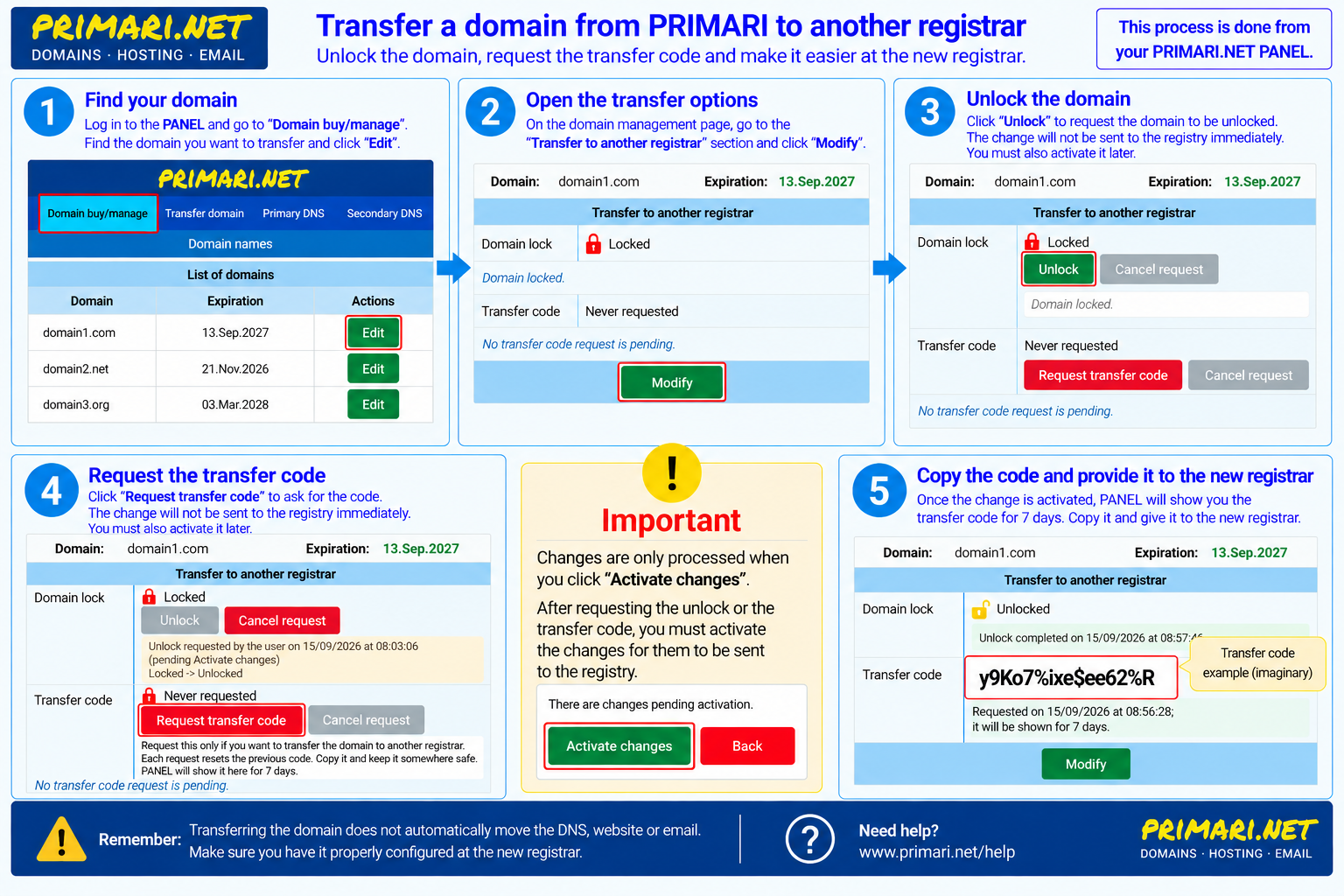
Before You Start
You need access to the PANELL account that manages the domain.
It is also advisable to decide in advance what you want to do with DNS, the website and email. Transferring the domain registration does not automatically move the website, email mailboxes or DNS configuration.
Some extensions may have their own conditions or time frames. From PANELL, the process is the same for the customer, but the registry response may be automatic or may require PRIMARI handling depending on the type of domain.
Steps in PANELL
1. Log in to PANELL
Log in to PANELL with your user.
2. Open Domain Management
Open the management page for the domain you want to transfer.
3. Find the Transfer Block
Find the Transfer to another registrar block and click Modify.
4. Unlock the Domain If Needed
Check the domain lock status.
If the domain is locked, click Unlock. This request will remain pending until you activate the changes.
5. Activate the Unlock Request
Click Activate changes if PANELL tells you there is a pending request.
The unlock request is not sent to the registry until you activate the changes.
6. Request the Transfer Code
When the domain appears as unlocked, return to the Transfer to another registrar block and click Request transfer code.
PANELL will warn you that requesting a new code invalidates any previous code.
7. Activate the Code Request
Click Activate changes again if the request remains pending activation.
8. Wait Until the Code Is Available
Wait until PANELL shows the transfer code.
In some cases the response may be quick. In other cases, depending on the extension or registry, it may require PRIMARI handling.
9. Copy the Code and Give It to the New Registrar
Copy the code and keep it somewhere safe.
PANELL will show it for 7 days. It is also sent to the email address of the PANELL domain owner.
Give this code to the new registrar and follow their process.
Why Might the Domain Need to Be Unlocked?
The domain lock is a protection against unauthorized transfers.
While the domain is locked, another registrar cannot complete the transfer. For this reason, before giving the code to the new registrar, the domain must allow transfer.
What Is the Transfer Code?
The transfer code, or Auth-Code, is a domain-specific code used to authorize the transfer to another registrar.
It is not your PANELL password. Do not share it through unsafe channels or publish it in any document. If you request a new code, the previous code may stop being valid.
What Should I Give the New Registrar?
Normally you will need to give them:
- the domain name;
- the transfer code, if the extension uses one;
- any additional confirmation requested by the new registrar.
The actual transfer is initiated by the new registrar. PRIMARI provides the unlock and the code when applicable, but the domain does not leave PRIMARI just because you request the code.
What Happens After Requesting the Code?
PANELL will show you the request status. You can see whether it is pending Activate changes, sent to the registry, pending handling or whether the code is already available.
When the code is available, PANELL shows it for 7 days. Copy it only from a safe environment and keep it while the process with the new registrar is ongoing.
What Happens to DNS, the Website and Email?
Transferring the domain changes who manages the domain registration. It does not automatically move:
- the DNS configuration;
- the website;
- email mailboxes or redirects;
- website files;
- other services associated with the domain.
Before completing the transfer, confirm which DNS servers the domain will use and whether you want to keep any service at PRIMARI.
Why Might the Transfer Not Complete?
The most common reasons are:
- the domain is still locked;
- the transfer code is incorrect, old or expired;
- a new code has been requested and the previous one is no longer valid;
- the domain extension has its own conditions;
- the registry is still processing the request;
- a confirmation from the holder or from the new registrar is missing.
For more possible causes, see the related article about why a domain transfer can fail.